66% Steps Reduction
An audit of a symptom-tracking app, including a treatment shortcut that reduces the longer route from 3 taps to 1
Healthcare
Audit and redesign
Role
Product Designer
Timeline
2 weeks
team
Me
platform
Mobile App

Make treatment settings easier to reach
I audited a symptom-tracking app and identified four issues: inconsistent back behavior, journal entries that were hard to scan, a difficult-to-find treatment route, and a dark-mode contrast concern. This is an independent audit and redesign concept.
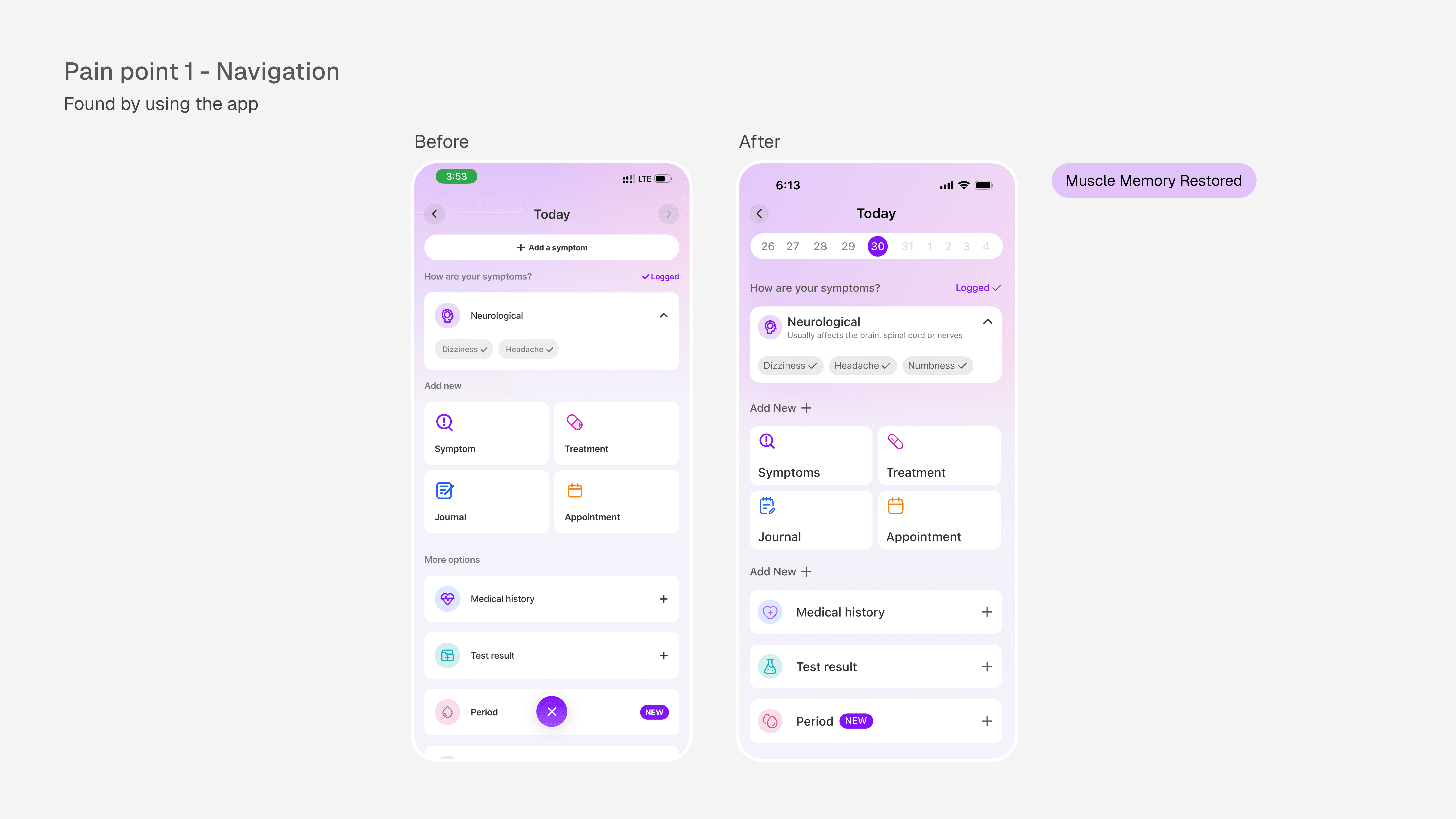
A Button That Looked Right But Wasn’t
On the Log Today screen, the top-left arrow controlled the calendar instead of going back. The screen used an X at the bottom as its exit action, unlike the rest of the app.
Redesigned the calendar component and its interaction pattern to free up the top-left corner, restoring the back arrow to its expected behavior.

Journal entries with nowhere to land
Journal entries appeared as truncated text without titles, which made it difficult to scan or find an older entry. I added a title field and a search action so entries have a visible label and can be found more directly.
This is a proposed redesign and I have not tested how quickly users can retrieve an entry.

The clearest change: a shorter route
In the original flow, the longer route to Manage Treatment is Home, Plan Tab, More, then Manage Treatment. In my proposed flow, it is Home, then Manage Treatment. That comparison reduces the route from three taps to one, or about 66% fewer taps for this route. It describes the flow shown in the concept; it is not a measured change in task time or user success.
The fix
I fixed this by creating a component on the home screen that will take users directly to their medications page.
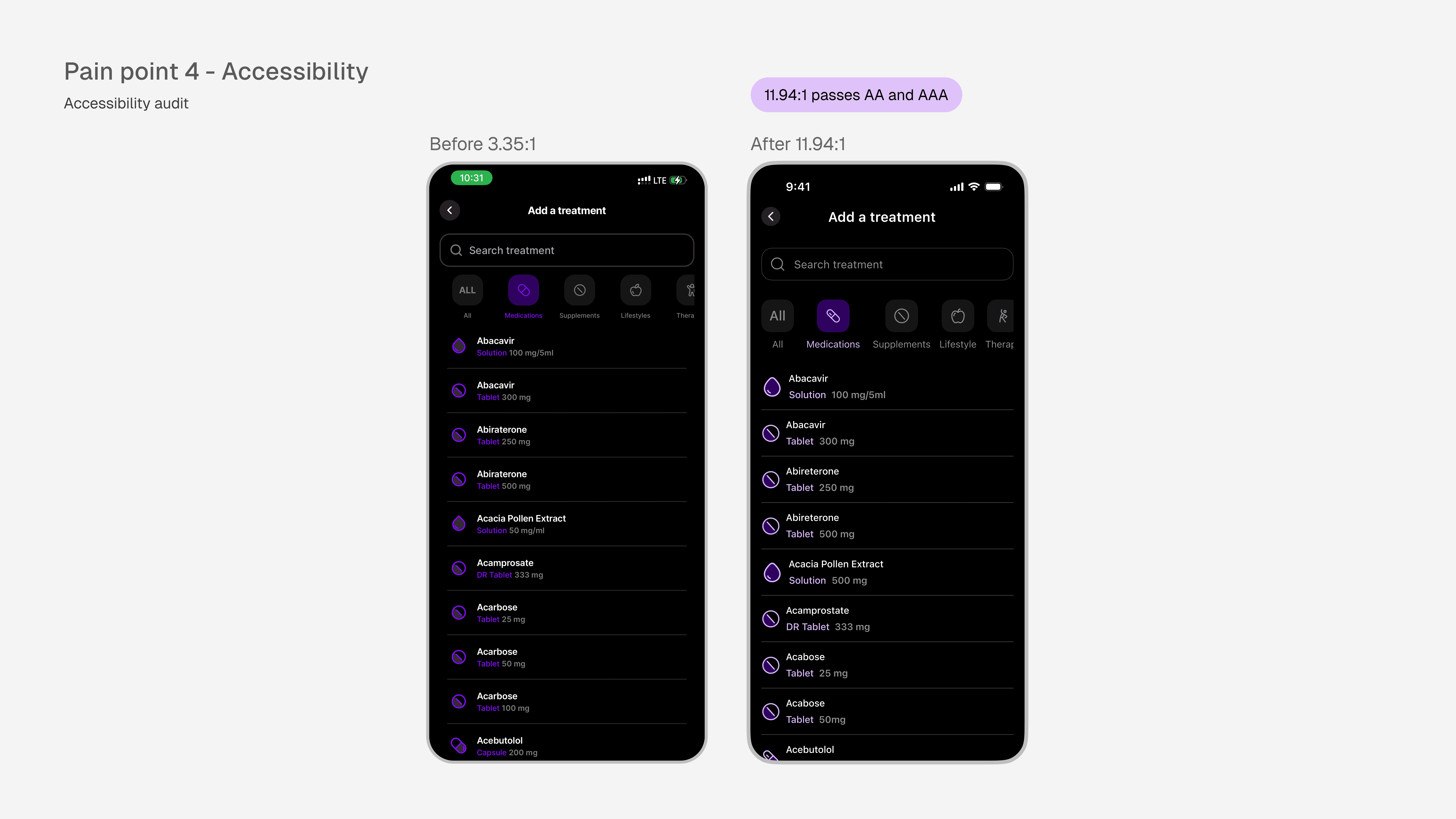
A contrast failure hiding in dark mode
In dark mode, several text elements fail WCAG accessibility standards. The measured contrast ratio was 3.35:1, below both the AA minimum of 4.5:1 and the AAA standard of 7:1. They used #810FF8 for text on #000000 background
For a health product used by people managing chronic conditions, often in low-light environments, sometimes with visual impairments, this isn't a cosmetic issue. It's a readability failure at the moment users need clarity most.
Beyond usability, it's a legal exposure according to digital accessibility laws in Australia for the private sector
"Strongly Recommended for Private Sector
While private businesses are not explicitly named in legislation, they can still face legal action under the DDA if their websites or apps are inaccessible. Following WCAG 2.2 Level AA is considered the practical legal requirement for all digital services in Australia. Adopting these standards helps private organisations reduce legal risk and demonstrate a commitment to accessibility."
Why this fix matters for health specifically
Users managing chronic conditions often check their app in bed, in dimly lit waiting rooms, or during stress. A product that's hard to read in those moments isn't just inconvenient, it fails the people who need it most.